


Introduction:
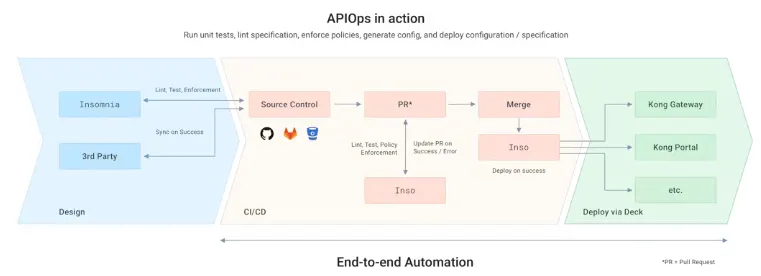
In the dynamic realm of digital transformation, optimizing technology investments is paramount. APIOps, blending DevOps and GitOps principles with API and microservice life cycles, presents a revolutionary approach. APIOps simplifies API and microservice management by integrating solid principles of automation, collaboration, and version control throughout the lifecycle. Let’s explore how APIOps transforms API management and fuels digital evolution.
What is APIOps?
APIOps streamlines the process of designing, implementing, and deploying APIs and microservices by applying the following key principles:
- Automation: Employs automated tools to ensure consistency and quality at every stage of the lifecycle.
- Collaboration: Facilitates seamless collaboration between developers, architects, and DevOps teams, fostering agility and innovation.
- Version Control: Implements version control practices, such as GitOps, to track changes and maintain a clear history of modifications.
- Quality Assurance: Enables early detection of deviations from standards, allowing for swift resolution and enhanced service quality.
Through these principles, APIOps promotes a culture of efficiency, reliability, and continuous improvement in API and microservice management. Let’s delve deeper into how organizations can leverage APIOps to streamline their API management processes and drive digital transformation.
Pre-requisites:
- Insomnia.
- Inso cli.
- deck cli.
- Kong Gateway setup.
Install Insomnia:
Insomnia is a free desktop app for API work, simplifying interaction, debugging, and testing. It offers a user-friendly interface with authentication helpers, code generation, and debugging tools. Insomnia supports API mocking and provides storage options like local, cloud sync, and Git repositories.
To install it on Ubuntu, follow these steps:
# Update packages
sudo apt update

# Install Insomnia:
sudo apt install insomnia
Press enter or click to view image in full size

Inso cli installation:
To install the Inso command-line tool (CLI) on your Ubuntu system, follow these steps:
# Update package and install wget downloader.
sudo apt update && sudo apt install wget

# Download the Inso CLI binary.
wget https://github.com/Kong/insomnia/releases/download/lib%408.4.5/inso-linux-8.4.5.tar.xz

# Extract the downloaded file.
tar -xf inso-linux-8.4.5.tar.xz -C /tmp

# Copy the extracted file to a directory in your system's PATH.
sudo cp /tmp/inso /usr/local/bin/

# Verify and Check the version of Inso.
inso --version
Deck cli Installation:
Deck CLI is a tool by Kong for managing Kong Gateway configurations via the command line. It helps configure services, routes, and plugins, facilitating setup, deployment, and automation of Kong Gateway. Deck simplifies managing API infrastructure with its intuitive command-line interface.
To install the Deck command-line tool (CLI) on your Linux system, follow these steps:
# Download the Deck CLI.
curl -sL https://github.com/kong/deck/releases/download/v1.29.2/deck_1.29.2_linux_amd64.tar.gz -o deck.tar.gz

# Extract the downloaded file.
tar -xf deck.tar.gz -C /tmp

# Copy the extracted file to a directory in your system's PATH.
sudo cp /tmp/deck /usr/local/bin/

# Check the version of Deck you've installed.
deck version
Adding API Specification to Insomnia and Creating Test Cases:
Let’s add sample Pet-store API Document(OpenApi Specification):
- Open Insomnia and create a new document or collection.
- Import your API specification file, such as
petstore-spec.yaml, into Insomnia.
pestore-spec.yaml:
swagger: '2.0'
info:
description: 'This is a sample server Petstore server. You can find out more about Swagger at [http://swagger.io](http://swagger.io) or on [irc.freenode.net, #swagger](http://swagger.io/irc/). For this sample, you can use the api key `special-key` to test the authorization filters.'
version: 1.0.0
title: Swagger Petstore
termsOfService: 'http://swagger.io/terms/'
contact:
email: apiteam@swagger.io
license:
name: Apache 2.0
url: 'http://www.apache.org/licenses/LICENSE-2.0.html'
host: petstore.swagger.io
basePath: /v2
tags:
- name: pet
description: Everything about your Pets
externalDocs:
description: Find out more
url: 'http://swagger.io'
- name: store
description: Access to Petstore orders
- name: user
description: Operations about user
externalDocs:
description: Find out more about our store
url: 'http://swagger.io'
schemes:
- https
- http
paths:
/pet:
post:
tags:
- pet
summary: Add a new pet to the store
description: 'bvgyghyc'
operationId: addPet
consumes:
- application/json
- application/xml
produces:
- application/xml
- application/json
parameters:
- in: body
name: body
description: Pet object that needs to be added to the store
required: true
schema:
$ref: '#/definitions/Pet'
responses:
'200':
description: successful operation
'405':
description: Invalid input
security:
- petstore_auth:
- 'write:pets'
- 'read:pets'
put:
tags:
- pet
summary: Update an existing pet
description: 'nvhgc'
operationId: updatePet
consumes:
- application/json
- application/xml
produces:
- application/xml
- application/json
parameters:
- in: body
name: body
description: Pet object that needs to be added to the store
required: true
schema:
$ref: '#/definitions/Pet'
responses:
'200':
description: successful operation
'400':
description: Invalid ID supplied
'404':
description: Pet not found
'405':
description: Validation exception
security:
- petstore_auth:
- 'write:pets'
- 'read:pets'
/pet/findByStatus:
get:
tags:
- pet
summary: Finds Pets by status
description: Multiple status values can be provided with comma separated strings
operationId: findPetsByStatus
produces:
- application/xml
- application/json
parameters:
- name: status
in: query
description: Status values that need to be considered for filter
required: true
type: array
items:
type: string
enum:
- available
- pending
- sold
default: available
collectionFormat: multi
responses:
'200':
description: successful operation
schema:
type: array
items:
$ref: '#/definitions/Pet'
'400':
description: Invalid status value
security:
- petstore_auth:
- 'write:pets'
- 'read:pets'
/pet/findByTags:
get:
tags:
- pet
summary: Finds Pets by tags
description: 'Multiple tags can be provided with comma separated strings. Use tag1, tag2, tag3 for testing.'
operationId: findPetsByTags
produces:
- application/xml
- application/json
parameters:
- name: tags
in: query
description: Tags to filter by
required: true
type: array
items:
type: string
collectionFormat: multi
responses:
'200':
description: successful operation
schema:
type: array
items:
$ref: '#/definitions/Pet'
'400':
description: Invalid tag value
security:
- petstore_auth:
- 'write:pets'
- 'read:pets'
deprecated: true
'/pet/{petId}':
get:
tags:
- pet
summary: Find pet by ID
description: Returns a single pet
operationId: getPetById
produces:
- application/xml
- application/json
parameters:
- name: petId
in: path
description: ID of pet to return
required: true
type: integer
format: int64
responses:
'200':
description: successful operation
schema:
$ref: '#/definitions/Pet'
'400':
description: Invalid ID supplied
'404':
description: Pet not found
security:
- api_key: []
post:
tags:
- pet
summary: Updates a pet in the store with form data
description: 'nbvgfuy'
operationId: updatePetWithForm
consumes:
- application/x-www-form-urlencoded
produces:
- application/xml
- application/json
parameters:
- name: petId
in: path
description: ID of pet that needs to be updated
required: true
type: integer
format: int64
- name: name
in: formData
description: Updated name of the pet
required: false
type: string
- name: status
in: formData
description: Updated status of the pet
required: false
type: string
responses:
'200':
description: successful operation
'405':
description: Invalid input
security:
- petstore_auth:
- 'write:pets'
- 'read:pets'
delete:
tags:
- pet
summary: Deletes a pet
description: 'bncyfcxy'
operationId: deletePet
produces:
- application/xml
- application/json
parameters:
- name: api_key
in: header
required: false
type: string
- name: petId
in: path
description: Pet id to delete
required: true
type: integer
format: int64
responses:
'200':
description: successful operation
'400':
description: Invalid ID supplied
'404':
description: Pet not found
security:
- petstore_auth:
- 'write:pets'
- 'read:pets'
'/pet/{petId}/uploadImage':
post:
tags:
- pet
summary: uploads an image
description: 'bvcytcy'
operationId: uploadFile
consumes:
- multipart/form-data
produces:
- application/json
parameters:
- name: petId
in: path
description: ID of pet to update
required: true
type: integer
format: int64
- name: additionalMetadata
in: formData
description: Additional data to pass to server
required: false
type: string
- name: file
in: formData
description: file to upload
required: false
type: file
responses:
'200':
description: successful operation
schema:
$ref: '#/definitions/ApiResponse'
security:
- petstore_auth:
- 'write:pets'
- 'read:pets'
/store/inventory:
get:
tags:
- store
summary: Returns pet inventories by status
description: Returns a map of status codes to quantities
operationId: getInventory
produces:
- application/json
parameters: []
responses:
'200':
description: successful operation
schema:
type: object
additionalProperties:
type: integer
format: int32
security:
- api_key: []
/store/order:
post:
tags:
- store
summary: Place an order for a pet
description: 'bcycgh'
operationId: placeOrder
produces:
- application/xml
- application/json
parameters:
- in: body
name: body
description: order placed for purchasing the pet
required: true
schema:
$ref: '#/definitions/Order'
responses:
'200':
description: successful operation
schema:
$ref: '#/definitions/Order'
'400':
description: Invalid Order
'/store/order/{orderId}':
get:
tags:
- store
summary: Find purchase order by ID
description: For valid response try integer IDs with value >= 1 and <= 10. Other values will generated exceptions
operationId: getOrderById
produces:
- application/xml
- application/json
parameters:
- name: orderId
in: path
description: ID of pet that needs to be fetched
required: true
type: integer
maximum: 10
minimum: 1
format: int64
responses:
'200':
description: successful operation
schema:
$ref: '#/definitions/Order'
'400':
description: Invalid ID supplied
'404':
description: Order not found
delete:
tags:
- store
summary: Delete purchase order by ID
description: For valid response try integer IDs with positive integer value. Negative or non-integer values will generate API errors
operationId: deleteOrder
produces:
- application/xml
- application/json
parameters:
- name: orderId
in: path
description: ID of the order that needs to be deleted
required: true
type: integer
minimum: 1
format: int64
responses:
'200':
description: successful operation
'400':
description: Invalid ID supplied
'404':
description: Order not found
/user:
post:
tags:
- user
summary: Create user
description: This can only be done by the logged in user.
operationId: createUser
produces:
- application/xml
- application/json
parameters:
- in: body
name: body
description: Created user object
required: true
schema:
$ref: '#/definitions/User'
responses:
'200':
description: successful operation
/user/createWithArray:
post:
tags:
- user
summary: Creates list of users with given input array
description: 'jcyrsuryj'
operationId: createUsersWithArrayInput
produces:
- application/xml
- application/json
parameters:
- in: body
name: body
description: List of user object
required: true
schema:
type: array
items:
$ref: '#/definitions/User'
responses:
'200':
description: successful operation
/user/createWithList:
post:
tags:
- user
summary: Creates list of users with given input array
description: 'hgctrduy'
operationId: createUsersWithListInput
produces:
- application/xml
- application/json
parameters:
- in: body
name: body
description: List of user object
required: true
schema:
type: array
items:
$ref: '#/definitions/User'
responses:
'200':
description: successful operation
/user/login:
get:
tags:
- user
summary: Logs user into the system
description: 'bcurxyjh'
operationId: loginUser
produces:
- application/xml
- application/json
parameters:
- name: username
in: query
description: The user name for login
required: true
type: string
- name: password
in: query
description: The password for login in clear text
required: true
type: string
responses:
'200':
description: successful operation
schema:
type: string
headers:
X-Rate-Limit:
type: integer
format: int32
description: calls per hour allowed by the user
X-Expires-After:
type: string
format: date-time
description: date in UTC when token expires
'400':
description: Invalid username/password supplied
/user/logout:
get:
tags:
- user
summary: Logs out current logged in user session
description: 'bncyuxyjhc'
operationId: logoutUser
produces:
- application/xml
- application/json
parameters: []
responses:
'200':
description: successful operation
'/user/{username}':
get:
tags:
- user
summary: Get user by user name
description: 'bctfxykcj'
operationId: getUserByName
produces:
- application/xml
- application/json
parameters:
- name: username
in: path
description: 'The name that needs to be fetched. Use user1 for testing. '
required: true
type: string
responses:
'200':
description: successful operation
schema:
$ref: '#/definitions/User'
'400':
description: Invalid username supplied
'404':
description: User not found
put:
tags:
- user
summary: Updated user
description: This can only be done by the logged in user.
operationId: updateUser
produces:
- application/xml
- application/json
parameters:
- name: username
in: path
description: name that need to be updated
required: true
type: string
- in: body
name: body
description: Updated user object
required: true
schema:
$ref: '#/definitions/User'
responses:
'200':
description: successful operation
'400':
description: Invalid user supplied
'404':
description: User not found
delete:
tags:
- user
summary: Delete user
description: This can only be done by the logged in user.
operationId: deleteUser
produces:
- application/xml
- application/json
parameters:
- name: username
in: path
description: The name that needs to be deleted
required: true
type: string
responses:
'200':
description: successful operation
'400':
description: Invalid username supplied
'404':
description: User not found
securityDefinitions:
petstore_auth:
type: oauth2
authorizationUrl: 'https://petstore.swagger.io/oauth/authorize'
flow: implicit
scopes:
'write:pets': modify pets in your account
'read:pets': read your pets
api_key:
type: apiKey
name: api_key
in: header
definitions:
Order:
type: object
properties:
id:
type: integer
format: int64
petId:
type: integer
format: int64
quantity:
type: integer
format: int32
shipDate:
type: string
format: date-time
status:
type: string
description: Order Status
enum:
- placed
- approved
- delivered
complete:
type: boolean
default: false
xml:
name: Order
User:
type: object
properties:
id:
type: integer
format: int64
username:
type: string
firstName:
type: string
lastName:
type: string
email:
type: string
password:
type: string
phone:
type: string
userStatus:
type: integer
format: int32
description: User Status
xml:
name: User
Category:
type: object
properties:
id:
type: integer
format: int64
name:
type: string
xml:
name: Category
Tag:
type: object
properties:
id:
type: integer
format: int64
name:
type: string
xml:
name: Tag
Pet:
type: object
required:
- name
- photoUrls
properties:
id:
type: integer
format: int64
category:
$ref: '#/definitions/Category'
name:
type: string
example: doggie
photoUrls:
type: array
xml:
name: photoUrl
wrapped: true
items:
type: string
tags:
type: array
xml:
name: tag
wrapped: true
items:
$ref: '#/definitions/Tag'
status:
type: string
description: pet status in the store
enum:
- available
- pending
- sold
xml:
name: Pet
ApiResponse:
type: object
properties:
code:
type: integer
format: int32
type:
type: string
message:
type: string
externalDocs:
description: Find out more about Swagger
url: 'http://swagger.io
- Once imported, Generate collection. Click on
Generate Request collectionas shown below.
Press enter or click to view image in full size

- Update environment file by adding
basic_urlas shown below. Then click onclose.
Press enter or click to view image in full size

- Ensure to include various test scenarios covering different endpoints and use cases. Click on
Test> click onNew Test Suiteand Create test suite namedNew Suite. - click on
New Testand Create tests in suite as shown below.
Press enter or click to view image in full size

- Validate the API requests and responses within Insomnia to confirm they align with the specification.
Exporting Insomnia Configuration — v4 file:
After setting up your API specification and test cases in Insomnia, export the configuration:
- Click on
Exportunderspecdrop-down as shown.
Press enter or click to view image in full size

- Select Requests to Export (check all requests), Then click on
Exportfor apply export requests.
Press enter or click to view image in full size

- Select the desired format (JSON or YAML) for exporting: Click on drop down and select
JSON/YAML. - Click on
Donebutton and SelectYes. - Save the exported file, which contains your Insomnia configuration and test suites: Rename your file and Click on
Exportbutton.
Press enter or click to view image in full size

Deploying to Kong Using Deck CLI:
Utilize Deck CLI to deploy your API configuration to Kong Gateway.
- Ensure Deck CLI is installed and configured with your Kong environment.
- Use
deck dumpto generate a Kong configuration file based on the current state of your Kong setup.
# Verify connectivity with Kong
deck ping --tls-skip-verify --kong-addr $ADMIN_URL --headers Kong-Admin-Token:$ADMIN_PASSWORD

# Export Kong configuration to a file
deck dump --tls-skip-verify --kong-addr $ADMIN_URL --headers Kong-Admin-Token:$ADMIN_PASSWORD
- Merge the exported Insomnia configuration file with the existing Kong configuration.
- Use
deck syncto apply the merged configuration to your Kong environment.
# sync inso config with kong config
deck sync --tls-skip-verify --kong-addr http://localhost:8001 --headers Kong-Admin-Token:password -s kong.yaml -s inso-kong.yaml
- Convert the API specification file to a Kong configuration file using the Inso CLI, execute the following commands.
# check spec lint
inso lint spec --src Insomnia_petstore.yaml "PetStore"

# run test suites
inso run test --src Insomnia_petstore.yaml "New Suite" --env "Swagger env"

# Generate config
inso generate config "PetStore" --src "Insomnia_petstore.yaml" -k 3 --type declarative -o inso-kong.yaml
Setting up Continuous Deployment with GitHub Actions:
To automate the deployment of your Kong configuration file, we’ll use GitHub Actions. GitHub Actions allow you to automate tasks directly from your GitHub repository. We’ll create a workflow that triggers whenever changes are pushed to the master branch. Follow these steps to set it up:
- Navigate to your GitHub repository where you have your APIOps project.
- Click on the
Actionstab. - Click on
Set up a workflow yourselforNew workflow. - Replace the contents of the YAML file with the following:
name: APIOps
on:
  workflow_dispatch:
  push:
    branches:
      - master
jobs:
  ApiOps:
    runs-on: ubuntu-latest
    name: APIOps
    steps:
    - name: Checkout
      uses: actions/checkout@v2
    - name: Inso CLI installation
      run: |
        sudo apt update
        sudo apt install wget
        wget https://github.com/Kong/insomnia/releases/download/lib%408.4.5/inso-linux-8.4.5.tar.xz
        tar -xf inso-linux-8.4.5.tar.xz
        echo "---------------------------"
        ./inso --version
        echo "---------------------------"
    - name: decK CLI installation
      run: |
        curl -sL https://github.com/kong/deck/releases/download/v1.29.2/deck_1.29.2_linux_amd64.tar.gz -o deck.tar.gz
        tar -xf deck.tar.gz -C /tmp
        sudo cp /tmp/deck /usr/local/bin/
        echo "---------------------------"
        deck version
        echo "---------------------------"

    - name: Deploy kong config file
      run: |
        ./inso lint spec --src Insomnia_employees.yaml "Employees"
        ./inso run test --src Insomnia_employees.yaml "Employees-test" --env "OpenAPI env"
        ./inso generate config "Employees" --src "Insomnia_employees.yaml" -k 3 --type declarative -o inso-kong.yaml
        # ./inso lint spec --src Insomnia_httpbin.yaml "httpbin"
        # ./inso run test --src Insomnia_httpbin.yaml "New Suite" --env "OpenAPI env httpbin.org"
        # ./inso generate config "httpbin" --src "Insomnia_httpbin.yaml" -k 3 --type declarative -o inso-kong.yaml
        deck dump --tls-skip-verify --kong-addr $ADMIN_URL --headers Kong-Admin-Token:$ADMIN_PASSWORD
        deck sync --tls-skip-verify --kong-addr $ADMIN_URL --headers Kong-Admin-Token:$ADMIN_PASSWORD -s kong.yaml -s inso-kong.yaml
      env:
        ADMIN_URL: ${{ vars.admin_url }}
        ADMIN_PASSWORD: ${{ vars.admin_password }}
- Save the file with a name like
apiops-workflow.yamlin the.github/workflowsdirectory of your repository. - Create GitHub Actions secrets named
ADMIN_URLandADMIN_PASSWORD. Use your Kong admin URL and password (or token if RBAC is enabled) as their values.
With this setup, every time you push changes to your master branch, GitHub Actions will automatically run the workflow defined in this YAML file. It will install the necessary tools, generate the Kong configuration file using Inso CLI, and deploy it using decK CLI.
Conclusion:
In this guide to APIOps with Insomnia, Deck, and GitHub Actions, we’ve uncovered a streamlined approach to API deployment. By integrating automation, collaboration, and version control, organizations can efficiently manage their API lifecycle.
Insomnia provides a user-friendly platform for designing, documenting, and testing APIs, while the Inso CLI simplifies the export process for integration into deployment pipelines.
Deck CLI facilitates the management of Kong Gateway configurations, enabling automated deployments and updates. By leveraging GitHub Actions, deployments become automated, ensuring consistency across environments.
In summary, the combination of Insomnia, Deck, and GitHub Actions offers a powerful solution for organizations seeking to streamline APIOps processes and drive digital transformation. Embracing these tools empowers teams to deliver high-quality APIs with efficiency and reliability.