

Your Fun-Filled Guide to Connecting Google Cloud Storage and Azure Data Factory
Introduction:
In today’s digital world 🌐, think of data as our jungle gym, and cloud providers like Google Cloud Storage (GCS) and Azure Data Factory (ADF) as the coolest rides in the park.
Mastering multi-cloud data pipelines is like becoming the jungle gym champion🏆 — it’s exciting, it’s essential, and it’s not just for tech geeks.
So, get ready for a fun-filled🥳 journey as we swing, climb, and slide through the world of multi-cloud data pipelines. This is first of series of blog posts im going to write.
Prerequisites:
1. Create a GCP account (if not already done).
2. Create a GCS Bucket
3. Create an Azure account
4. Set up an Azure Data Factory instance.

Understanding Google Cloud Storage and Azure Data Factory
Note: If you’re already familiar with them, feel free to skip ahead to more advanced content.
Google Cloud Storage (GCS):
· Scalable and fully managed object storage service by Google Cloud.
· Ideal for storing unstructured data like documents, images, and videos.
Key concepts:
· Buckets: Containers for organizing data.
· Objects: Individual data pieces stored in buckets.
· Object Versioning: Supports version control.
· Access Control: Fine-grained permissions via IAM.
Azure Data Factory (ADF):
· Cloud-based data integration service by Microsoft Azure.
· Creates, schedules, and automates data workflows (data pipelines).
Key concepts:
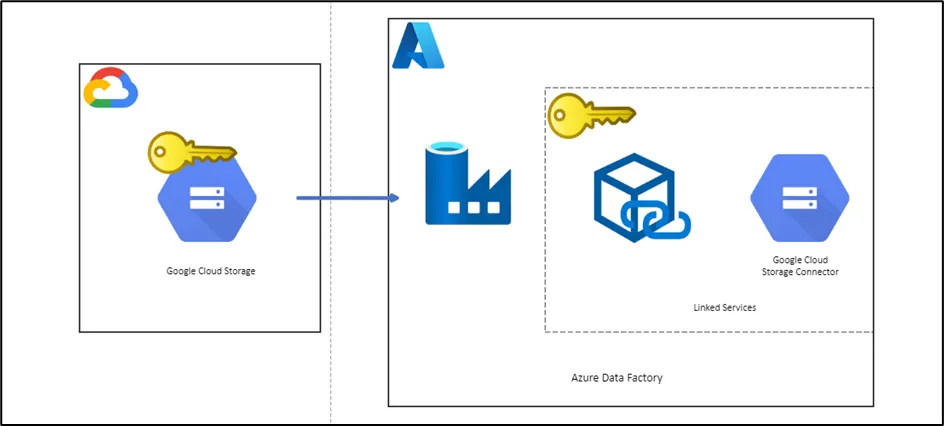
· Linked Services: Connect to external data sources.
· Data Pipelines: Define data flow from source to destination.
· Data Sets: Structure and schema of data.
· Activities: Individual tasks within pipelines.
· Triggers: Schedule pipeline execution
Setting Up the Connection
Creating Linked Services:
I) After creating Azure Data Factory Instance, Click on “Launch Studio”.

2. Create a linked service in ADF for GCS
I) Manage >> Linked Services >> New >> New linked service

II) Selecting Google Cloud Storage as a linked service

Authentication and Access Control
I) Go to Google Cloud Storage Bucket << Settings << Interoperability

II) Getting Access key ID and Secret Access key from GCS Settings

Finally test the connection

Conclusion
In a data-centric world driven by multi-cloud strategies, mastering the art of building multi-cloud data pipelines is essential. The ability to seamlessly move and manage data across diverse cloud environments empowers organizations to stay agile, cost-effective, and competitive. Understanding Google Cloud Storage (GCS) and Azure Data Factory (ADF) is not just a technical skill but a key to unlocking the full potential of data assets. Embrace this journey, for in the multi-cloud era, data flows freely, and the future belongs to those who can connect the dots across clouds with confidence.
Stay tuned for the next multi-cloud data pipeline adventure! 🚀